Content Cannibalization Checker
Find Pages Competing for the Same Keyword
Detect when multiple pages on your site are targeting the same keyword, causing them to compete against each other in search rankings. Get instant analysis and actionable recommendations to fix SEO conflicts.
Why Check for Content Cannibalization?
Protect your SEO rankings by identifying and fixing keyword conflicts
Find Competing Pages
Instantly discover multiple pages on your site targeting the same keyword, causing them to compete in search results.
Detailed Analysis
Get in-depth metrics for each page including keyword density, optimization score, and ranking position.
Fast Detection
Our crawler analyzes your site in seconds to identify all pages with keyword conflicts.
Actionable Recommendations
Receive specific, step-by-step recommendations to fix cannibalization issues and improve rankings.
SEO Metrics
View keyword density, internal links, optimization scores, and more for each competing page.
Improve Rankings
Fix cannibalization to consolidate ranking signals and boost your search engine visibility.
How Content Cannibalization Detection Works
Enter Domain & Keyword
Simply provide your domain and the keyword you're targeting. We'll search your entire site for pages competing for this keyword.
Site Crawl & Analysis
Our crawler visits your pages, analyzes content, extracts SEO metrics, and identifies which pages are targeting the same keyword.
Conflict Detection
We calculate keyword density, optimization scores, and determine if multiple pages are competing for rankings.
Get Recommendations
Receive specific recommendations: which page to keep, which to redirect, how to consolidate content, and more.
How to Use This Tool Effectively
Actionable SEO advice to get the most out of every analysis
Start With Your Competitors
Run your top 3 competitors through this tool first. Understanding their structure, keywords, and technical issues reveals exactly where you can outrank them.
Run Monthly Audits
SEO is not a one-time task. Schedule monthly checks to catch new issues before Google penalizes them. Consistent analysis beats one big yearly audit every time.
Fix High-Impact Issues First
Not all errors are equal. Prioritize: broken crawl paths → missing meta titles → slow load times → thin content. This order maximizes ranking gains per hour spent.
Internal Links Are Free PageRank
Every internal link passes authority between your pages. Use the Internal Link Finder to ensure your most important pages receive the most internal links.
Page Speed Directly Affects Rankings
Google's Core Web Vitals are a confirmed ranking factor. Pages loading under 2.5 seconds see significantly higher rankings and 40% lower bounce rates than slow pages.
Keep Your Sitemap Clean
Your sitemap tells Google what to index. Remove redirect chains, 404s, and noindex pages from it. A clean sitemap = faster, more complete indexation of good content.
More Free SEO Tools
Everything you need to dominate search rankings — all free, no signup required
🔍 SEO & Website Analysis
🧮 Free Calculators
⚙️ Developer & Utility Tools
How Content Cannibalization Checker works, step by step
Enter the domain to check.
 Download it
Enter the target keyword you want to check for overlap.
Content Cannibalization Checker
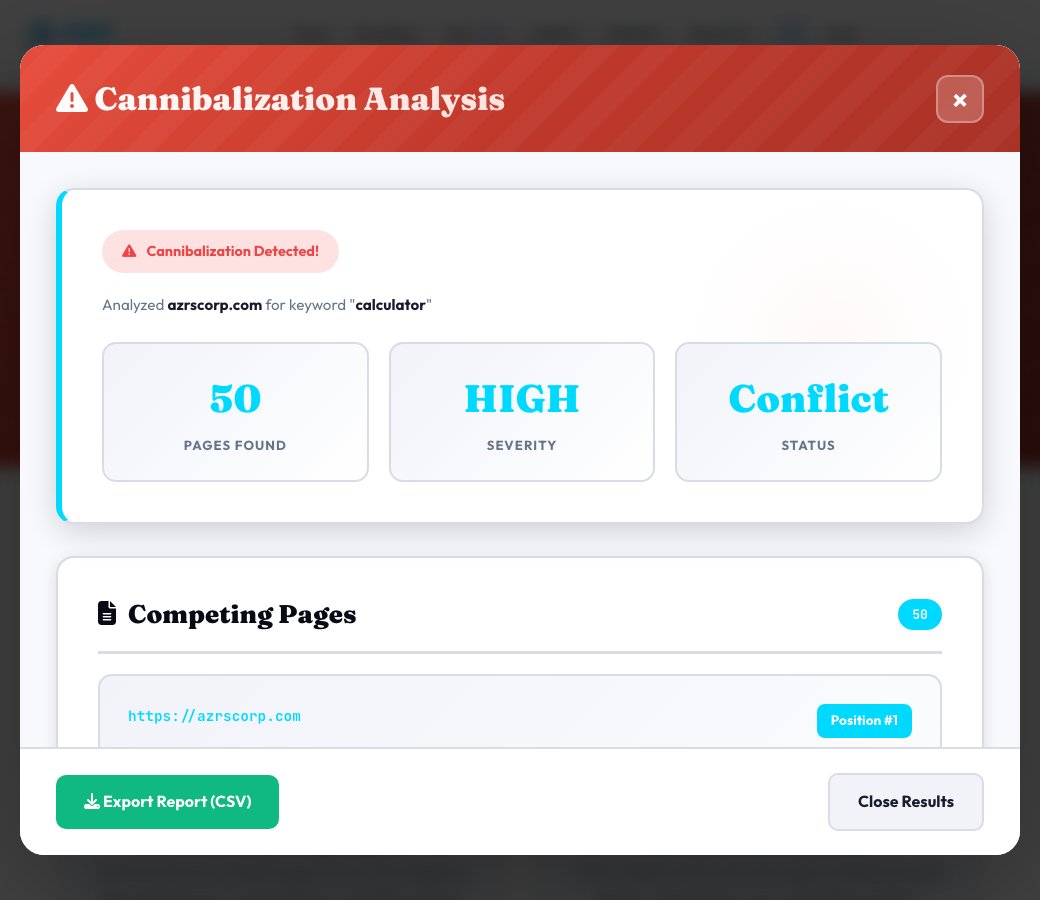
Enter a domain and a target keyword, and this tool crawls the site (up to 50 pages), scores every page it finds for real on-page keyword usage — whether the keyword appears in the title, H1, URL and meta description, plus keyword density — and flags it when more than one page on the site is genuinely competing for the same keyword.
This is an on-page, crawl-based check: it looks at how the keyword is actually used across your own site's pages, not live Google ranking positions pulled from a rank-tracking API, so what you're seeing is exactly what a search engine would see when comparing those pages against each other for that keyword.
Key features
Real domain crawl
Crawls the actual site (up to 50 pages) instead of guessing from a sitemap or manual list.
On-page keyword scoring
Checks title, H1, URL and meta description usage plus keyword density for each page found.
Severity rating
Summarizes how serious the overlap is, from a single relevant page to several pages directly competing.
Actionable recommendations
Specific fixes — consolidate, differentiate or redirect — tailored to what was actually found.
How to use it
- Enter the domain to check.
- Enter the target keyword you want to check for overlap.
- Run the check and let it crawl the site for pages using that keyword.
- Review the flagged pages and follow the consolidate/differentiate/redirect recommendations.
Worked example
Example
Checking 'project management software' turns up three separate blog pages all optimized for that exact phrase — a clear cannibalization flag, with a recommendation to consolidate the two weaker pages into the strongest one.
Who uses this tool
SEO specialists diagnosing stalled rankings
Find out if multiple pages are splitting ranking signals for the same keyword before troubleshooting anything else.
Content teams with a large back catalog
Spot overlapping articles written months apart that ended up targeting the same term.
Site owners consolidating content
Get a clear list of which pages to merge, redirect or differentiate before a content cleanup.
Tips for the best results
- Check your most important commercial keywords first — cannibalization on money pages costs the most.
- If two pages are genuinely both useful, differentiate them by search intent (e.g. 'best X' vs 'how to use X') instead of merging.
- Use a 301 redirect from the weaker page to the stronger one when consolidating, to keep any existing link equity.
- Re-check after making changes to confirm the overlap is actually resolved.
Common mistakes to avoid
- Assuming any keyword match at all means cannibalization — check title/H1/URL usage, not just body mentions.
- Deleting the weaker page outright instead of redirecting it, which loses any links or traffic it was getting.
- Fixing the pages but never re-checking to confirm search engines see the change.
Why use AZRS QuickFix?
It is 100% free, needs no signup and has no watermark or usage limits. The tool runs in your browser, so what you type stays on your device, and it works on phones, tablets and desktops. New tools are added every week — bookmark this page or browse the full QuickFix toolbox.
Frequently asked questions
What counts as cannibalization here?
More than one crawled page on the domain scoring meaningfully on the same target keyword across title, H1, URL, meta description and density.
Does this pull real Google ranking positions?
No — it's an on-page, crawl-based check of how the keyword is actually used across your site's pages, not a live SERP rank-tracking lookup.
How many pages does it crawl per check?
Up to 50 pages from the domain you enter.
What should I do with a flagged cannibalization?
Follow the specific recommendation shown — usually consolidating the weaker page into the stronger one, differentiating them by intent, or adding a canonical/redirect.
Can I check the same domain and keyword again after fixing it?
Yes, re-running the check crawls fresh and will confirm whether the overlap is resolved.
Is this free?
Yes, free with no signup required.